Setting up a dedicated VR fitness space at home is the ultimate shortcut to consistent workouts. There are no expensive gym memberships, no driving in traffic, and no waiting around for sweaty machines. You just put on your headset and start sweating in seconds.
However, moving vigorously with a screen strapped to your eyes introduces a very real physical challenge: protecting your furniture, your TV, and yourself.
In Chapter 3 of Get Fit with Virtual Reality, I share how optimizing my room transformed my living room into a high-intensity virtual dojo. You don’t need a giant garage or an empty room—just a smart setup. Here is my complete step-by-step guide to building a safe, high-performance VR fitness space at home.
Quick TL;DR: 5 Steps to Build Your VR Fitness Space at Home
Step 1: Secure a 6×6 Foot Perimeter
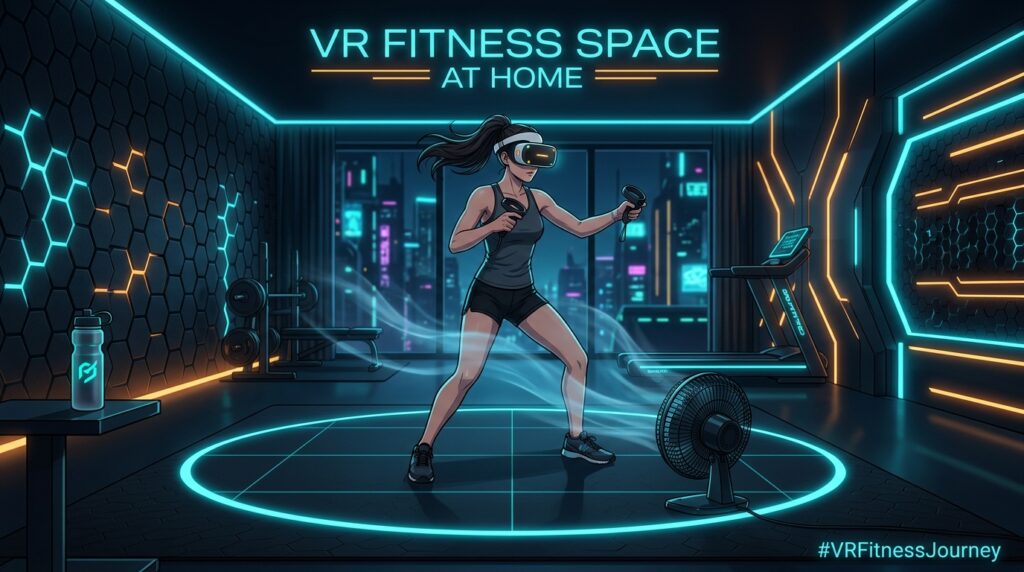
Clearance ZoneAim for a minimum 6×6 foot (2×2 meter) obstacle-free area. Push coffee tables back and ensure pets and family members won’t wander into your swing path.
Step 2: Check Vertical Overhead Clearance
Ceiling SafetyLow-hanging ceiling fans and light fixtures are the #1 destroyer of VR controllers during high-uppercut boxing matches or upward Beat Saber slashes.
Step 3: Anchor Yourself with Tactile Flooring
Center AnchorPlace a round or rectangular yoga mat in the exact center of your space. Feeling the texture shift beneath your feet keeps you centered without breaking immersion.
Step 4: Position a Floor Fan for Airflow & Orientation
Cooling & CompassA high-velocity fan pointed at your chest circulates cool air through your headset vents to stop lens fogging while acting as a tactile wind compass.
Step 5: Calibrate Your 6-Inch Guardian Buffer
Guardian CalibrationDraw your virtual boundary 6 inches inside of physical walls, cabinets, and screens. Always tighten your controller wrist straps before firing up a game.
Room Lighting & Tracking Fundamentals
Both the Meta Quest 3 and PlayStation VR2 rely on optical inside-out tracking cameras. To maintain seamless, lag-free tracking during high-speed workouts:
- Avoid Direct Sunlight: Never exercise with direct sunlight hitting your headset or play space. Sunlight creates optical glare for tracking cameras and can permanently burn VR display panels if it hits the interior lenses.
- Maintain Even Ambient Light: Diffused overhead lighting or warm LED lamps give the headset’s optical sensors crisp tracking contrast without casting harsh shadows.
Level Up Your VR Fitness Space at Home with Proven Guides
A well-prepared space gives you the confidence to punch harder, dodge faster, and immerse yourself completely:
- 📖 Get Fit with Virtual Reality: The Ultimate Beginner’s Guide: My comprehensive manual covering room calibration, workout routines, and injury prevention.
- 🎧 Audiobook Available Now: Listen to the complete narration on Audible and Amazon while you set up your room!
- 📓 Physical Tracking: Log your workouts, active minutes, and calorie burns in the VR Fitness Tracking Journal.
- 💻 Digital Telemetry: Prefer tracking online? Log your workout telemetry inside the VRFJ Mainframe App.
Equip Your Setup for VR Fitness Space at Home
Before launching your next session:
- Compare top headsets in my PSVR2 vs Meta Quest 3 Fitness Guide.
- Find the best workout titles in my Best VR Fitness Games Tier List.
- Browse non-slip mats, grip socks, and fans on the VR Fitness Gear Recommendations hub.
How have you set up your VR fitness space at home? Share your workout battlestation photos with our community on Twitter with #VRFitnessJourney or jump into our Reddit Community!
Health & Fitness Disclaimer: The content, workout routines, heart rate zones, and calorie estimates on VR Fitness Journey and the VRFJ Mainframe are for informational and entertainment purposes only and do not constitute medical advice. Consult a physician before beginning any high-intensity virtual reality exercise program, especially if you have pre-existing cardiovascular or orthopedic conditions.